How to Manage Multiple Temporary Inboxes in One Account
By OTPINB Team · Published 2026-11-03 · Reviewed 2026-11-03
Sign in to OTP Inbox to keep your bound temporary mailboxes in one account and switch between them. A Free account can hold 5 mailboxes and create 10 new ones in a rolling 24 hours. Premium raises both limits to 100 and adds 30-day Inbox and Sent retention while membership is active.
These are mailbox-management benefits. New mailboxes remain public on configured domains, even with Premium. Do not store confidential mail or important account-recovery credentials in them.
Start with a task, not a pile of addresses
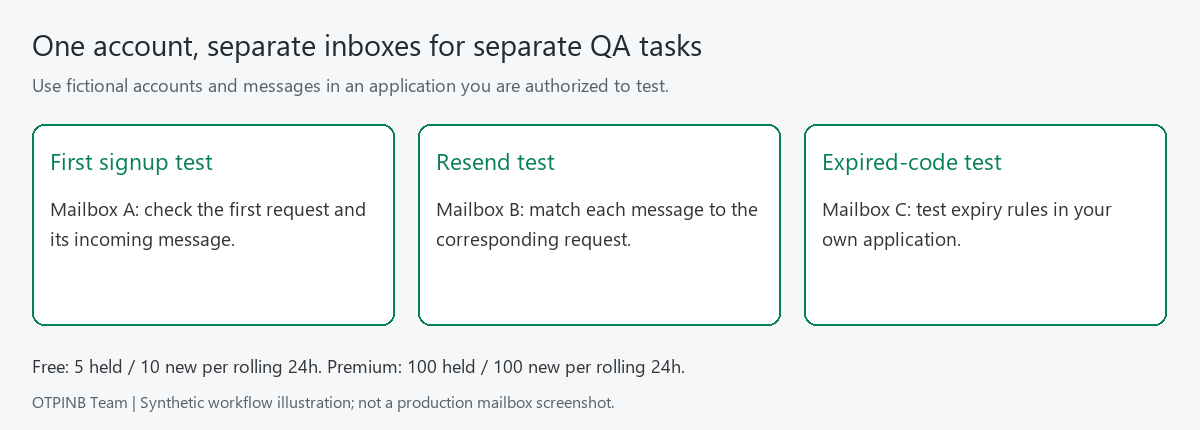
Several inboxes are useful when they help distinguish real tasks. For an application you control, you might separate a first signup test, a resend-code test and an expired-code test. Each test then has its own incoming messages instead of sharing one confusing thread.
Before creating more mailboxes, decide what each one is for. Keep your own test notes and avoid including a person's real name or sensitive identifier in a public address.
The accompanying diagram shows three synthetic QA tasks and one account's mailbox list. It is a workflow illustration, not evidence that customer mail has been inspected or that a production bulk-create test was performed.
Sign in and create a mailbox
Use the site's supported Google or email/password sign-in, then open mailbox management. Choose an available domain and complete any verification shown during creation. Confirm that the new address appears in your account before using it in a test.
The available domains are controlled by the operator and your account's plan. Some are reserved for Premium; some remain Admin-only. Premium does not mean that you can register arbitrary domains or connect your own domain through an unimplemented self-service feature.
Copy the full address into the application you are testing. If you change the selected mailbox, check the full address again before requesting another email.
Switch between mailboxes and use the combined view
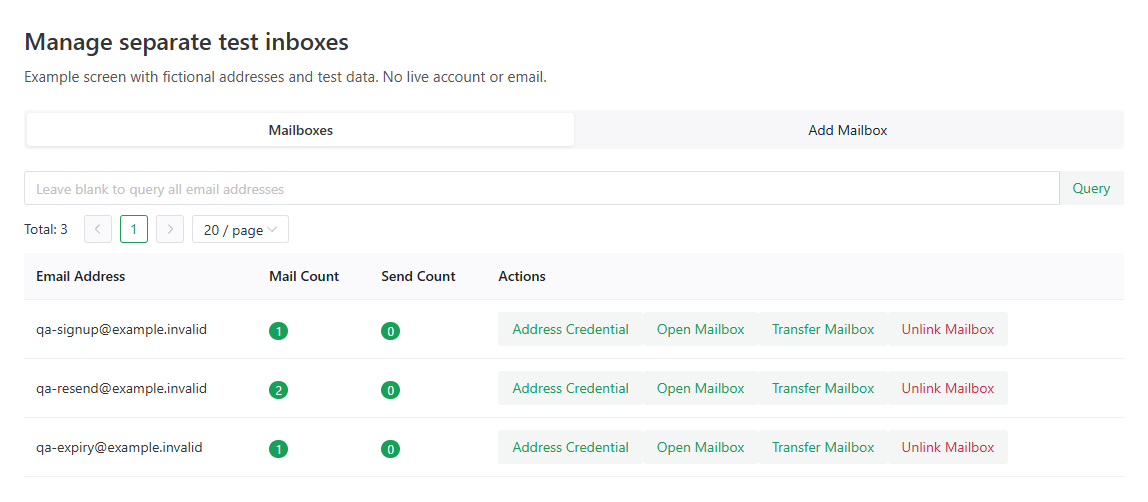
Your account's address list helps you return to an existing bound mailbox. Use the selected address when you need to inspect a particular test, and the account's multi-inbox view when you want to see messages across bound addresses.
Check the recipient address when several tests send similar subjects. A verification message for one test should not be used to complete a different account's request.
For repeated testing, record the test case and expected result in your own notes. A larger mailbox limit gives you room to separate workflows; it does not replace a test plan or make code extraction infallible.
Understand the two mailbox limits
| Plan | Mailboxes bound at once | New mailbox creation in a rolling 24 hours |
|---|---|---|
| Free account | 5 | 10 |
| Premium account | 100 | 100 |
Guest creation uses a separate limit of 5 per network/IP in a rolling 24 hours. People on the same network may share that allowance. Sign in if you want account-based mailbox management rather than relying on a guest session.
The concurrent limit counts how many mailboxes your account holds. The creation limit counts new creation activity over the rolling window. Deleting or unbinding a mailbox does not erase its creation history or refill that allowance immediately.
As a synthetic example, suppose a Free account has created 10 addresses during the last 24 hours but currently holds only 2. Having space in the address list does not automatically make another creation available. Both conditions have to be satisfied.
Keep retention and membership expiry in view
Free Inbox and Sent messages have 1-day retention. Active Premium provides 30-day retention from arrival, not 30 extra days added every time you revisit a message.
When Premium expires, Premium privileges end and Free rules apply, with the documented additional 7-day cleanup protection for mail after natural expiry. Do not treat that protection as a promise of continued Premium capacity or as permanent storage. Review the current plan details before relying on a retention period for a specific task.
Public lookup access and the sender's code expiry have separate rules from stored-message cleanup. See how long temporary email lasts before treating a visible address as a guarantee that an old message remains available.
For critical records, choose an appropriate permanent private email service. Temporary public mailboxes are designed for short-term use.
Add Telegram notifications when they help
If you prefer to step away from the browser, link Telegram to the web account and confirm the link on the website. Enable notifications only for the mailboxes you want to follow.
The verified web account supplies the plan, quota and domain permissions. The bot does not create an independent Premium allowance. It can help create or read mailboxes within those permissions and send opted-in notifications; it does not send outgoing email or spend your Balance.
Turn notifications off or unlink the account when you no longer need them. Treat notifications as another place where message information can appear, especially on shared devices.
Keep sending Credits separate from mailbox capacity
Receiving mail does not spend Credits. Each new mailbox gets 1 gift sending Credit. Sending costs 1 Credit per recipient and uses the mailbox gift first. Your shared account Credits can be used afterward when you explicitly select that option.
Premium does not refill sending Credits every day or at renewal. You can buy additional Credits using your USD Balance when needed. More mailboxes and more sending Credits solve different problems, so choose the one your workflow actually needs.
Decide whether Free is enough
Free is a useful starting point if your active tasks fit within 5 mailboxes and short retention. Premium is relevant when you need more concurrent mailboxes, a higher daily creation limit or longer message retention.
Both monthly and yearly Premium have the same benefits. Membership is prepaid rather than automatically renewing. Check the current Pricing page for the amount and term before purchasing.
If your main need is private long-term email, a larger public temporary-mail plan is not the right upgrade. Choose a service that provides that access model instead.
Sign in to manage your mailboxes, start with one clear task, and add addresses as the workflow needs them.